


Cut Kubernetes and cloud costs. Protect your margins.
Your infrastructure should fuel growth, not eat into your margins. Onicost uncovers avoidable spending and estimates potential savings. Give your team a clear place to start, without losing days to spreadsheets.
14 days of Team, no credit card required. Free stays free: 2 clusters, 32 cores, 3 members.
- Your team stays in controlRead-only access. No automatic changes.
- Data hosted in FranceWith Scaleway, in the Paris region.
- Access you can verifyPermissions documented in the public Helm chart.
- No credit card requiredTry Team with up to 5 cloud accounts.
See what you pay for. And what goes unused.
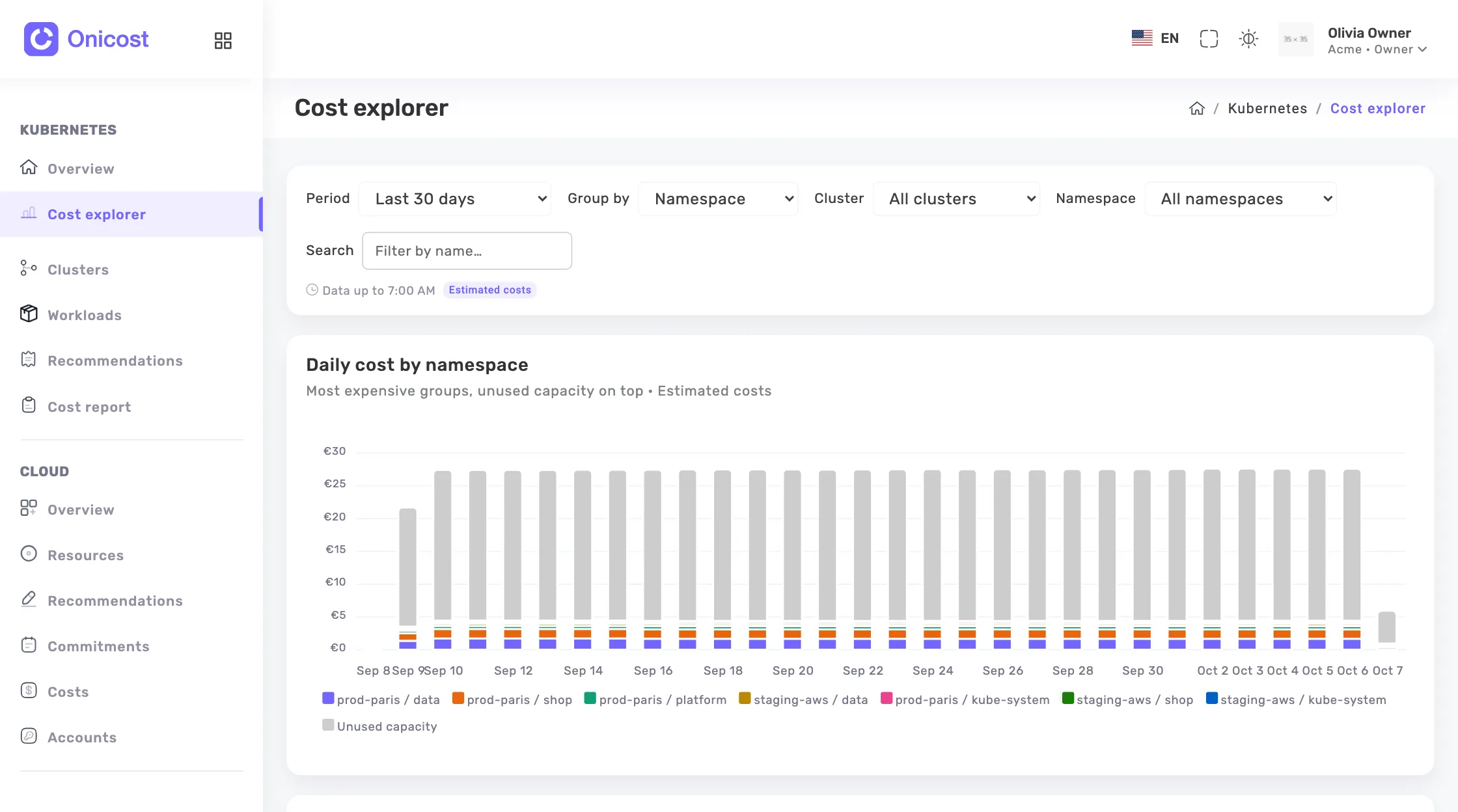
A clear view of your costs. Screenshots use demo data.
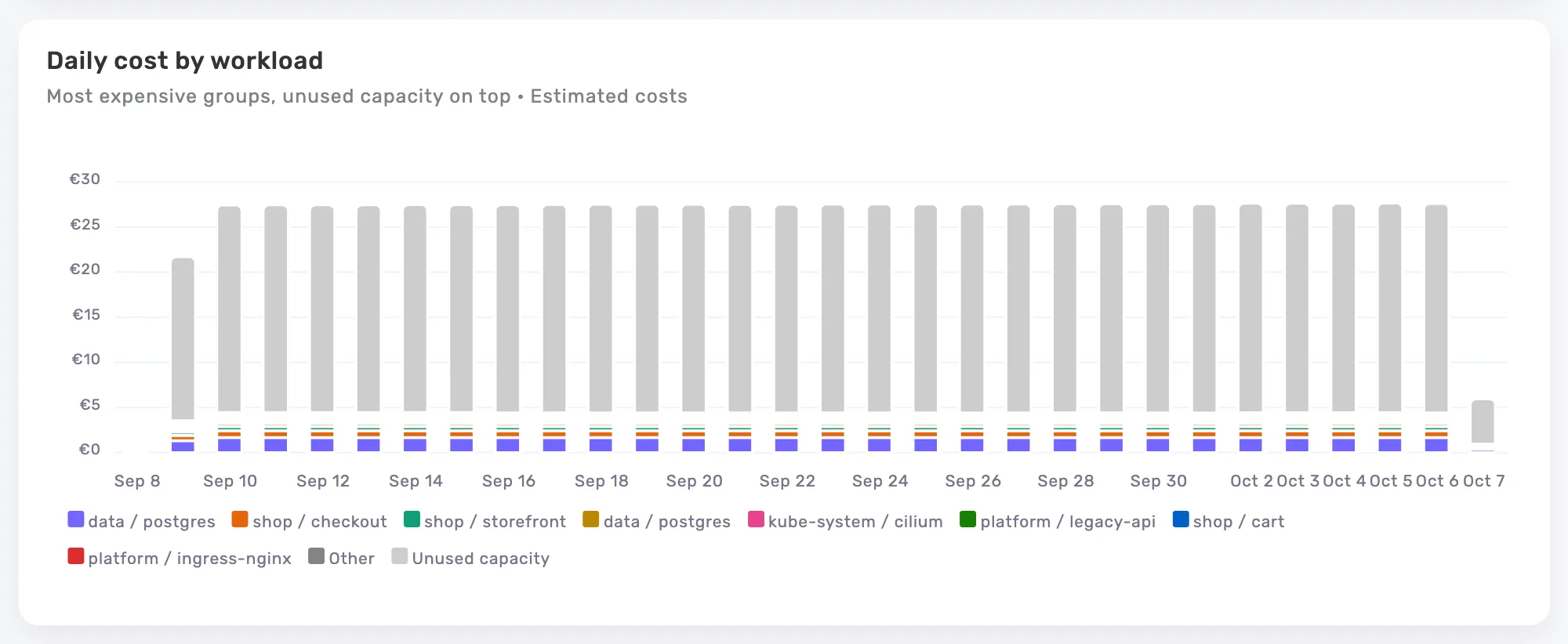
Put a price on unused capacity.
Separate workload costs from unused capacity. See which clusters spend your budget on resources your applications do not need.
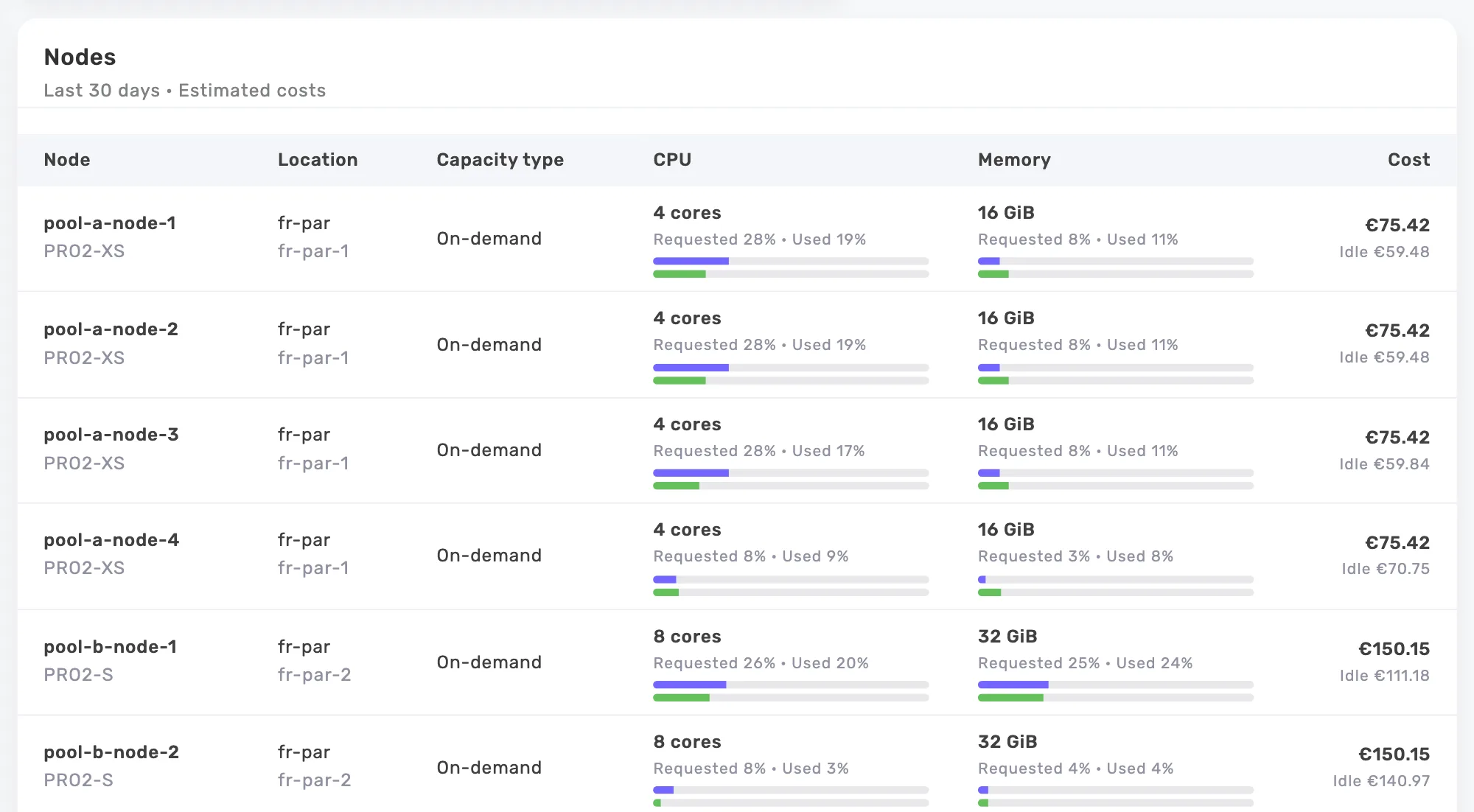
More capacity is not always the answer.
Compare requests, usage and node costs. Spot oversized capacity before paying for more resources.
Less avoidable spending. More time for your product.
Clear costs, quantified savings opportunities and a view of month-end spending. Built for engineering leaders and the business.
Costs you can trace to each product
Follow spending by cluster, namespace, workload or label. Use your team and product labels to see where the budget goes.
See where spending could come down
Oversized requests, idle workloads, underused nodes and orphaned volumes: connect each opportunity to its metrics and estimated monthly savings.
Estimate your month-end spend
Track Kubernetes costs and their month-end projection. Share CSV analyses and PDF cost reports with leadership.
Cloud resources you pay for but do not use
Connect AWS, Azure, Google Cloud or Scaleway. Find forgotten resources, oversized capacity and commitments worth reviewing in your billing data.
Team · Up to 5 cloud accountsKeep GPU and serverless costs in view
See GPU costs and capacity your workloads do not request. Track serverless pod costs and the share billed but not used.
Costs that reflect your rates
Public AWS, Azure, Google Cloud, OVHcloud and Scaleway prices updated daily, AWS spot at the public spot price. Apply your discount or a price per vCPU and per GiB for on-premises nodes.
From your data to decisions, in three steps.
Start with a cluster or a cloud account. Stay in control of the changes.
Connect your infrastructure
A Kubernetes agent or a cloud account, with read-only access.
Find avoidable spending
Detailed costs, unused resources and potential savings.
Take action with your team
Choose the changes and apply them with your usual tools.
From cloud spending to team decisions
“Our six EKS clusters cost €41,000 a month, and nobody knew which team used what. Broken down by the team label, the costs showed that 29% of the node bill paid for unused capacity. After three months of rightsizing we are at 12%, and each team’s monthly review starts from its own CSV export.”
“We run two Kapsule clusters at Scaleway, for about €2,900 a month. In the first week, Onicost flagged eleven orphan volumes and three staging environments that nobody used any more. Half a day of clean-up later, the bill is €640 a month lower.”
“I used to spend three days a month splitting the AKS bill across fourteen cost centers, with exports and a spreadsheet. The cost-center label now does the split, and the report goes to the executive committee as a PDF on the 2nd of the month. In the Cloud space, the rules also found €18,000 a year of underused Azure reservations.”
“Our clusters run in our own data center, so we entered a price per vCPU-hour taken from our full cost. Our CISO approved the agent in one meeting: read-only, no access to Secrets, outbound HTTPS only, data hosted in Paris. In six months the CPU requests of our 140 applications went down 35%, and we postponed buying four servers.”
Read-only access. You stay in control.
Onicost analyzes your data and recommends actions. Your team decides. Data is hosted in France, with cloud credentials encrypted at rest.
View safeguards and technical details
What the agent collects
- CPU and memory usage for containers and nodes.
- Container requests and limits.
- Nodes, namespaces, workloads and volumes, including labels and volume CSI attributes.
- Kubernetes version and agent operating counters.
What the agent does not send
- Secrets, ConfigMaps, annotations and environment variables.
- Logs, volume contents and container images.
- Namespaces and label keys excluded in the agent configuration.
Limited permissions.
The agent uses get, list and watch on the resources it needs, without access to Secrets or ConfigMaps.
Revocable tokens.
Each cluster has its own token. You can rotate it or revoke access.
An unprivileged agent.
The pod runs as a non-root user with a read-only root filesystem.
Outbound connections.
The agent sends its data over HTTPS. The chart creates no Service or Ingress.
Organization-scoped access.
Data and permissions are associated with your organization.
Encrypted cloud credentials.
Credentials are encrypted at rest and bound to their organization and account.
Defined roles.
Sign-in uses OIDC with PKCE. Owner, administrator and reader roles govern access.
Hosting in France.
Usage data, inventory, costs and cloud credentials are hosted by Scaleway in the Paris region.
A public chart.
Permissions and installation options can be reviewed under the Apache-2.0 license.
A free trial to find your savings opportunities.
Team starts at €99 per month, excluding tax: 32 cores included, up to 5 cloud accounts. The base fee also applies without a cluster. Additional cores follow your monthly average CPU capacity.
Free
See what your first clusters cost.
€0Free with no time limit.
Start for free- 2 clusters
- 32 billable cores
- 3 members
- Costs by cluster, namespace, workload and label
- Kubernetes recommendations
- CSV export
- Cloud workspace available with Team
- PDF reports available with Team
Recommended
Team
Stay on top of your SaaS infrastructure budget.
€99per month
Try Team32 cores included
Then €3.20 per core up to 500 cores, €2.60 beyond.
Billed monthly in arrears, based on measured average capacity. Excludes tax.
14 days, no credit card required. The trial starts with the agent’s first data, no later than 30 days after creating your organization.
Everything in Free, plus:
- Unlimited clusters and members
- Cloud workspace, up to 5 cloud accounts
- PDF cost reports
- 13 months of history
Business and Enterprise
Custom quote
Large volumes or specific contract requirements? Let’s talk about your infrastructure.
Request a quote
What would Onicost cost you?
- Base, 32 cores included
- €99.00
- 96 cores at €3.20
- €307.20
- Estimated monthly price, excluding tax
Above 5,000 cores, contact us for an Enterprise quote.
Billable cores are your nodes’ average CPU capacity over the month, rounded up to the next whole core. Memory, pods, members and the amount of your cloud spending are not billed.
Frequently asked questions
Can I use Onicost without Kubernetes?
Yes. Connect AWS, Azure, Google Cloud or Scaleway without a Kubernetes agent. The Cloud workspace is available with Team and during your trial.
Which cloud providers are supported?
Onicost estimates Kubernetes costs on AWS, Azure, Google Cloud, OVHcloud and Scaleway. For on-premises nodes or another provider, set your own prices per vCPU and GiB. The Cloud workspace supports AWS, Azure, Google Cloud and Scaleway.
Are the savings shown already achieved?
These are estimated monthly savings, not savings already achieved. Lower requests free up capacity; the return then depends on reducing billed resources and on your rates. Recommendations can overlap. Cloud estimates based on assumptions are counted separately.
Does Onicost apply recommendations automatically?
No. Your team chooses and applies changes using its own tools. Onicost provides the metrics and estimated savings where they can be calculated. You can dismiss or reopen a recommendation.
How accurate are Kubernetes costs?
Kubernetes costs are estimated from available prices and your settings. Workload, system and unused costs are shown separately; network traffic is excluded. A missing price does not mean free. AWS spot uses the public spot price. A missing instance type is estimated from the vCPU and GiB prices of its region when the provider publishes the data needed for it. Cloud billing data is analyzed separately.
What data does the agent collect?
The agent collects CPU and memory usage, requests and limits, resource inventory and labels. It does not send Secrets, ConfigMaps, annotations, environment variables, logs or volume contents. You can exclude namespaces and label keys.
How do I connect my first cluster?
Add a cluster in Onicost. You receive its token and the steps to follow with kubectl, Helm 3.14 or later and administrator permissions. The agent then sends its data.
How do I remove Onicost from a cluster?
Uninstall the Helm chart and delete the onicost namespace. Then delete the cluster in Onicost to remove its data and access.
helm uninstall onicost-agent --namespace onicostkubectl delete namespace onicostHow is Team pricing calculated?
Team costs €99 per month, excluding tax, with 32 cores included. Additional cores cost €3.20 up to 500 cores and €2.60 above that. Core count is the nodes’ average CPU capacity over the month, rounded up to the next whole core. There is no additional percentage charge on your cloud spending.
When does the Team trial start?
Trial features are available when you create your organization. The 14 days start with the agent’s first data, no later than 30 days after creation. You can connect a cloud account before your first cluster.
Where is my data hosted?
In France, with Scaleway in the Paris region. Your cloud account credentials are encrypted at rest. Payments use Stripe-hosted pages; Onicost does not store card details.
Find your first opportunities to save.
Connect your infrastructure. See what drives your spending. Give your team the numbers to act.
14-day Team trial. No credit card required.